

Appointment scheduling
Dental appointment scheduling software that keeps every chair on time
One calendar for every doctor, automatic WhatsApp reminders and online booking from your clinic website.
- Free setup help
- WhatsApp & SMS reminders
- Online booking
“Great service at reasonable price… team is very approachable… they always listen to our requirements and accommodate those features.”
Trusted by 500+ dental practices across India







Every appointment in one clear view
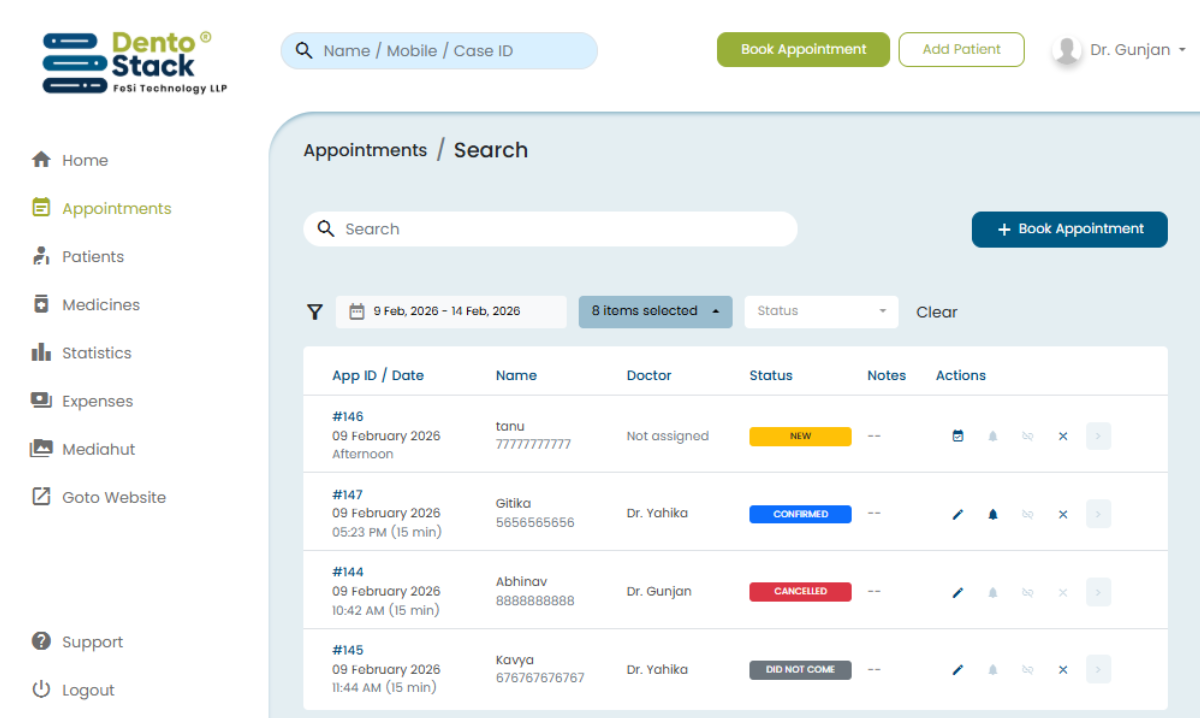
Our dental appointment scheduling software shows the whole day at a glance, for every doctor in your clinic.
- Switch between a list view and a calendar view: week and month on desktop, day view on your phone
- Six clear statuses: New, Confirmed, Walk-In, Completed, Did Not Come and Cancelled
- Drag an appointment to a new slot to reschedule it, or cancel it from the list
- Calendar colours show which doctor each appointment belongs to
| App ID / Date | Name | Doctor | Status |
|---|---|---|---|
| #104125 November 202609:30 AM (30 min) | Rahul Verma | Dr. Mehta | COMPLETED |
| #104225 November 202610:00 AM (15 min) | Priya Sharma | Dr. Mehta | CONFIRMED |
| #104325 November 202610:30 AM (15 min) | Anil Kumar | Dr. Kapoor | WALK-IN |
| #104425 November 202611:00 AM (45 min) | Sneha Iyer | Dr. Kapoor | NEW |
| #104525 November 202612:00 PM (15 min) | Mohit Jain | Dr. Mehta | DID NOT COME |
| #104625 November 202612:30 PM (30 min) | Kavya Rao | Dr. Kapoor | CANCELLED |
Screens show sample data.
Reminders that send themselves
Your dental appointment scheduling software messages patients on WhatsApp or SMS at every step, without your team picking up the phone.
- Appointment Confirmed As soon as you confirm the booking
- Appointment Rescheduled If the time changes
- Appointment Reminder 1 to 8 hours before, you choose
- Missed Appointment Reminder After a missed visit, if you turn it on
- Choose WhatsApp or SMS for your clinic, and switch each message on or off.
- Need to nudge someone? The Send Reminder button reminds any confirmed patient in one click.
Online booking from your clinic website
Patients request a slot at any hour. Your team confirms it in a click.
- Patients pick a date and a morning, afternoon or evening slot on your clinic website
- Each request arrives in your appointments as New, ready for your team to confirm
- A push alert in the Dentostack app tells you the moment a request comes in
- Turn on virtual appointments to let patients choose in-clinic or virtual
- Holidays you set are blocked, so nobody books a day you are closed
Rules that protect your schedule
Turn on the rules your clinic needs, and your dental appointment software applies them to every booking. Flip a switch to see what happens.
Blocks new appointments that overlap with confirmed slots. Turn off to allow intentional double-booking.
Block appointments outside your configured clinic hours. Turn off to only block night hours (12am–6am).
How long before the appointment the reminder message is sent.
Configure recurring weekly time windows when your calendar is unavailable for appointments.
Get the day's confirmed appointments every morning by:
Automatically add confirmed appointments to your calendar.
Screens show sample data. Settings and messages are as they appear in Dentostack.
Part of Dentostack's dental clinic management software
Appointments work together with patient records, billing, prescriptions and WhatsApp, all in one dashboard.
Frequently asked questions
Start taking online bookings
Our team sets up your dental appointment scheduling software with you.
-
1
Share your clinic details
Tell us your clinic hours, doctors and services, and we set up your calendar.
-
2
Choose your booking rules
Pick your reminder timing, clinic hours and each doctor's unavailable slots.
-
3
Go live on your website
Patients request appointments from your clinic website and reminders go out on their own.