

Patient records
Dental EMR software that keeps every case on record
Record each visit from complaint to treatment, attach X-rays to case notes and share a clean case summary on WhatsApp.
- Free setup help
- We migrate your data
- Share as PDF
“Professional, cooperative, extremely understanding staff and team. The services are great. They are always available on call.”
Trusted by 500+ dental practices across India





One clear record for every case
Our dental EMR software keeps every case under the same six headings, from the complaint to the treatment done.
- Chief complaint, examination notes, radiograph, diagnosis, treatment advised and treatment done for every case
- The patient's medical history shows at the top of each case
- Everything saves automatically as you type, with simple formatting
- Each case gets its own ID, like 20261125/57, to find it in seconds
Case notes with X-rays and photos
Keep the details that do not fit a heading, with the images that go with them.
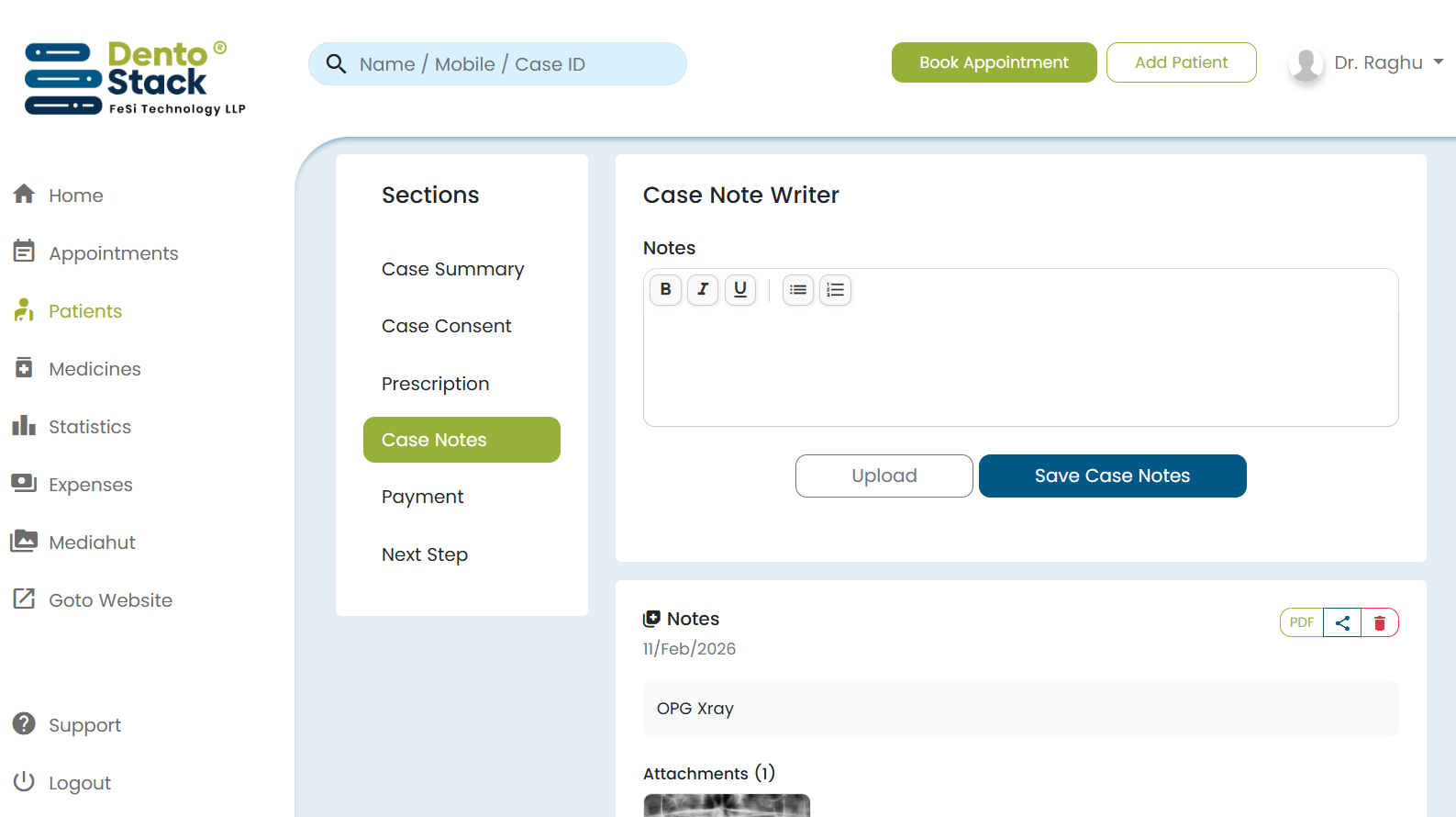
Case Note Writer
Write a dated note for any visit and attach X-rays, intraoral photos or reports to it.
- Upload X-rays, photos and PDF attachments
- Each note shows its date and the doctor who wrote it
- Download a Case Record PDF that includes your images
From first visit to closed case
A digital patient record for every case, from the day it opens to the day it closes.
-
Add Case
Pick the case date, chief complaint and doctor.
-
Record the visit
Examination notes, radiograph, diagnosis and treatment, all in one place.
-
Add notes and X-rays
Case notes keep every image and report with the case.
-
Share the summary
Send the case summary to the patient on WhatsApp, SMS or email.
-
Close or reopen
A closed case is locked for editing. Reopen it whenever treatment continues.
- Book the next appointment straight from the case
- Each doctor sees their own cases unless allowed more
- Encrypted and kept separate from every other clinic
Share records with patients, and take them back
Patients get their case summary as a PDF in seconds. You decide how long the link stays open.
- WhatsApp The PDF arrives as a document
- WhatsApp Web Sent from your clinic's own number
- SMS A link to download the PDF
- Email The PDF link in the patient's inbox
- Stop Sharing switches off the public links, and anyone opening an old link sees the page is no longer available.
- Case notes, with their attachments, can be shared in exactly the same way.
Print-ready records with your letterhead
Case summaries and case records carry your clinic's letterhead and the doctor's signature.
Choose how your letterhead appears on every document.
Merge case summary with prescription
Show empty box in case summary
Include signature on all relevant documents.
Limited: a doctor opens only the cases assigned to them.
Screens show sample data. Settings are as they appear in Dentostack.
Part of Dentostack's dental clinic management software
Case records connect to appointments, prescriptions, consent forms and billing, all in one dashboard.
Frequently asked questions
Go paperless with your case records
Our team sets up your dental EMR software with you.
-
1
Share your clinic details
Tell us about your clinic and doctors, and we set up your account and letterhead.
-
2
We move your patients
Our team migrates your existing patients, so their records start in one place.
-
3
Record your first case
Open a case at the next visit and share the summary before the patient leaves.