

Prescriptions
Dental prescription software that writes clear prescriptions in seconds
Pick medicines from your own list, set the dose and timing, and send a signed PDF to the patient on WhatsApp.
- Free setup help
- English & Hindi
- Your letterhead
“Great service at reasonable price… team is very approachable… they always listen to our requirements and accommodate those features.”
Trusted by 500+ dental practices across India







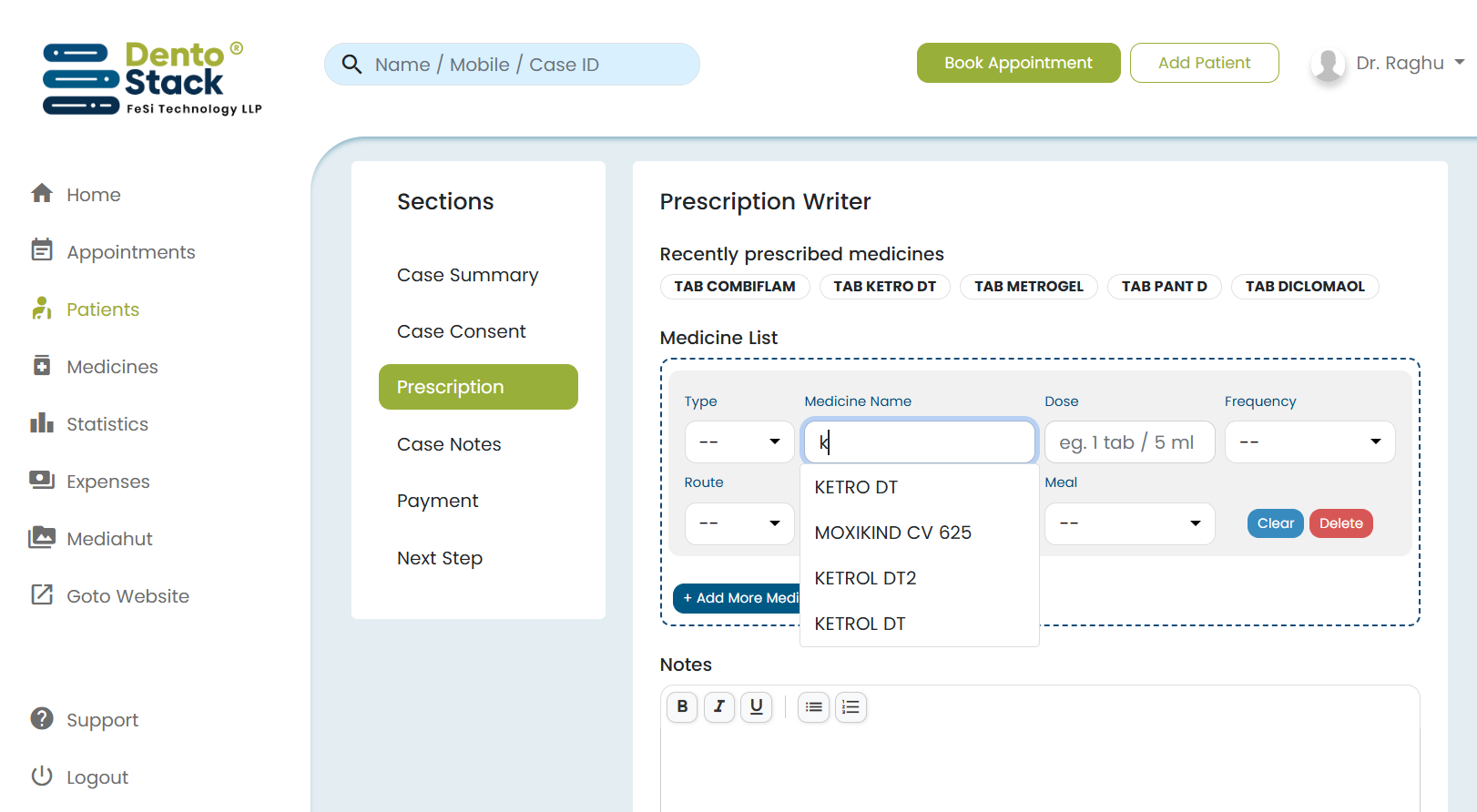
Write each medicine in a few clicks
Our dental prescription software gives every medicine the same clear set of details.
- Type: tablet, capsule, syrup, gel, injection, mouthwash or toothpaste
- Dose, frequency from daily to every four hours or as needed, and route
- Course duration in days, and before or after meal
- Add more medicines to the same prescription, and notes with simple formatting
Instructions your patients understand
Every medicine turns into one clear line, with Hindi help text if you want it.
- Dose, frequency, route, meal and days written as one easy line
- Turn on Hindi help text to add the timing and meal instructions in Hindi
- Set the document language to English or Hindi
- Each prescription is saved with the case and its date
Gets faster every time you prescribe
Your medicine list grows as you write, so regular prescriptions take a couple of clicks.
-
Type a new medicine
Write any medicine name with its details.
-
Added to your list
When you save, new medicines join your medicine list.
-
Suggested as you type
Start typing and matching medicines appear.
-
Recently prescribed
One tap adds a recent medicine with its dose, timing and days filled in.
- Each doctor sees their own recently prescribed medicines
- Several prescriptions can be saved in one case
Your letterhead, your signature, your language
Set it once in the document settings and every prescription prints the same way.
The language of the labels on your documents.
Show Hindi help text on prescriptions
Choose how your letterhead appears on every document.
Include signature on all relevant documents.
Merge case summary with prescription
No header while printing
Screens show sample data. Settings are as they appear in Dentostack.
Send the prescription before the patient leaves
Share the signed PDF in seconds, on the channel your patient uses.
- WhatsApp The PDF arrives as a document
- WhatsApp Web Sent from your clinic's own number
- SMS A link to download the PDF
- Email The PDF link in the patient's inbox
- Every prescription sent on WhatsApp shows in your WhatsApp inbox as Prescription Sent.
- Patients open the prescription from a link, with no app or login needed.
Part of Dentostack's dental clinic management software
Prescriptions sit inside each case, next to the case summary, case notes and billing.
Frequently asked questions
Start writing prescriptions in Dentostack
Our team sets up your dental prescription software with you.
-
1
Share your clinic details
Tell us about your clinic and doctors, and we set up your letterhead and signatures.
-
2
We move your patients
Our team migrates your existing patients, so prescriptions start with the right records.
-
3
Write your first prescription
Open a case at the next visit and send the prescription on WhatsApp.